diii
A web-based live-coding and management interface for iii devices, available here. The iii sibling of web-druid that communicates with crow and is in turn based on the python-based druid terminal app. Send commands, get text feedback, and manage the files on your iii device. See the source here.
requirements
Uses the Web Serial API that is only available in chromium-based browsers like Chrome, Chromium, Edge, and Opera.
Can be installed as a progressive web app via the install app button in the browser address bar, allowing for use without an internet connection.
connect
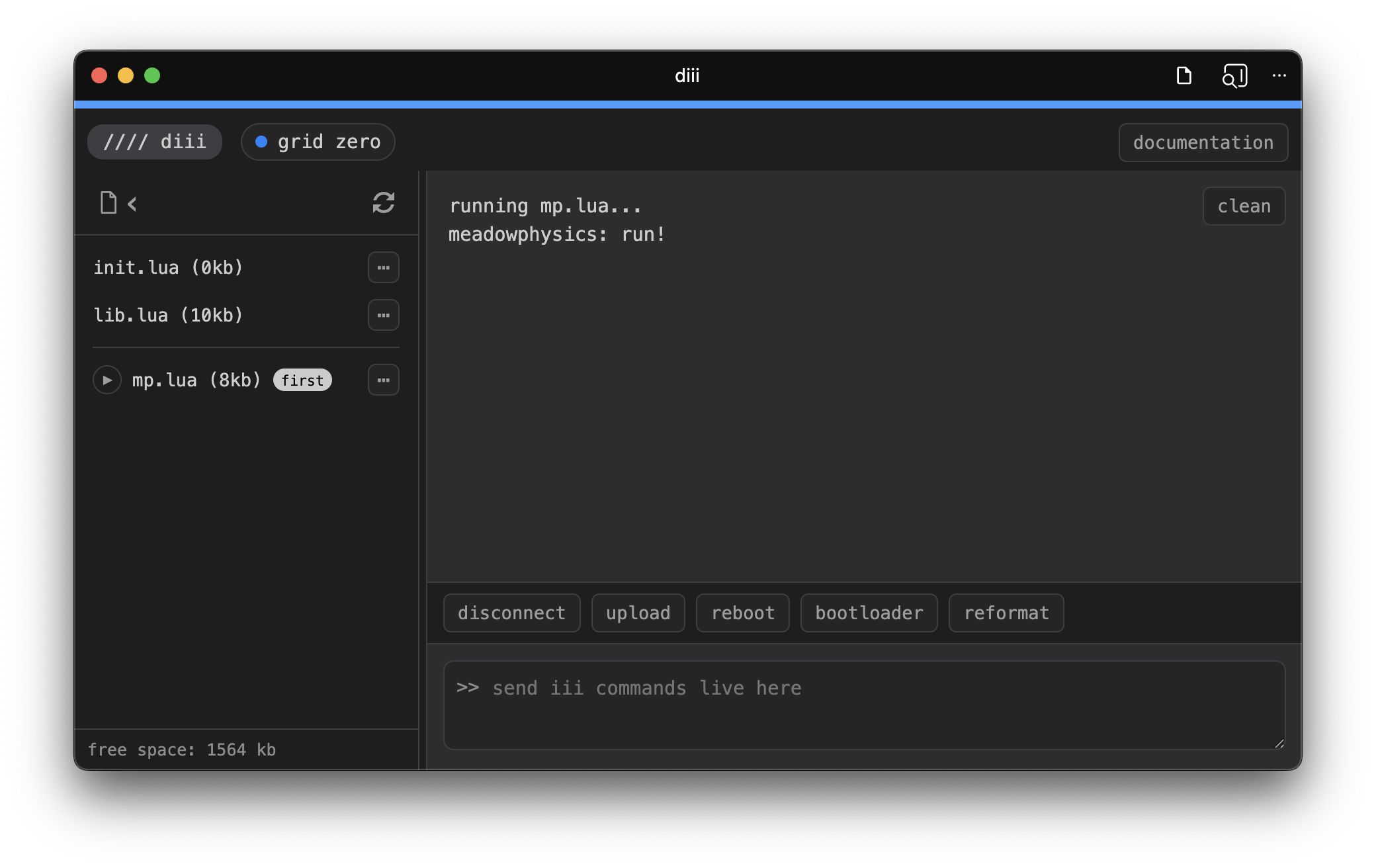
Click connect and then select your connected iii device from the list of USB serial devices. You should then see the list of files on the device appear. Once selected, the browser should automatically reconnect to this device until the tab is refreshed.
On the right of the file list is the repl (Read Execute Print Line) interface that lets you send and receive text to/from your iii device and view the history of this communication. You execute commands by typing into the repl input text box and pressing the enter/return key. Navigate the history of your commands using the up and down arrows with your cursor in the input box.
the file list
Click on the play button next to a file to run it.
Clicking the ··· next to a file will allow additional options:
- run runs the selected file
- download saves the selected file to your computer
- first sets the selected script to run automatically at startup
- read prints the contents of the selected file to the repl
- delete will remove the selected file from the device
uploading a script
To upload a script either click the upload button or execute u in the repl. Either one will launch a file picker for you to select a file. Note that uploading a script does not automatically run it.
To re-upload and run the same script during development, you can execute r, this will grab the latest version of that file from your computer.
the repl
In addition to the u and r commands mentioned above, you can also execute h to print a help menu in the repl.
There are a few special iii commands that you might need:
 ^^i          restart lua, run lib.lua then init.lua
 ^^c          restart lua without running lib.lua or init.lua
 help()       print all iii commands for this device
All other commands will be passed to the device’s Lua environment and any results will be printed. For details on all the iii commands available both in the repl and in script files, see the iii documentation here.
Above the repl input box are a few helpful buttons:
- connect/disconnect toggles the connection to your device
- upload launches the file picker to upload files
- reboot restarts the device (it will reconnect automatically and run init.lua if it exists)
- bootloader restarts the device into bootloader mode, which is only necessary for firmware updates
- reformat clears all the files on the device. Note that lib.lua will be recreated automatically on reboot.
Acknowledgements
Based on web-druid which is in turn based on druid.
Code by Dune Desormeaux aka @dessertplanet, commissioned by @tehn.